Article · Cloud & FinOps
Cloud Cost Optimization: A FinOps Playbook for 2027

By Caleb Ngeno · October 27, 2026
Problem
Cloud spend is the only major line item in most IT budgets that can grow without a purchase order. A team enables a managed service, a data pipeline starts scanning more history, a product experiment ships to production, and the invoice moves. Nobody decided to spend more. The architecture and the operating model simply allowed it.
Finance sees a rising run rate. Engineering sees independent technical choices. Neither group has the full picture. FinOps closes that gap with unit economics.
Architecture
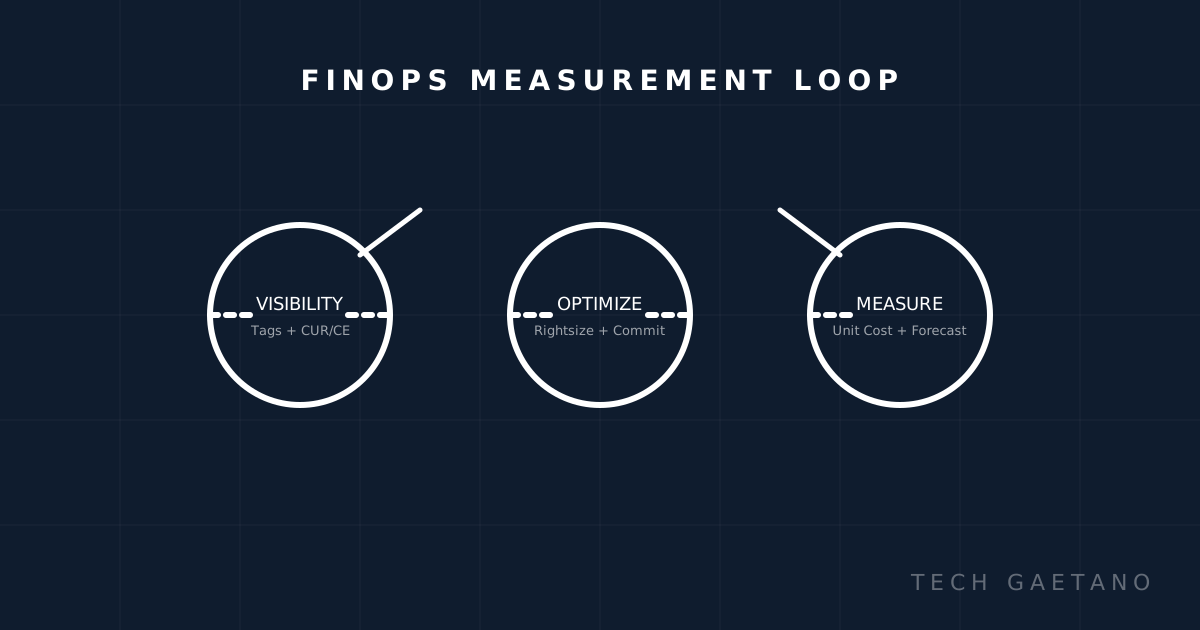
The loop is simple: Visibility → Optimize → Measure. Repeat monthly.
| Phase | Tools | Output |
|---|---|---|
| Visibility | AWS Cost Explorer/CE, Cost and Usage Report (CUR), tags, FOCUS | Tagged spend by owner/service/environment |
| Optimize | Compute Optimizer, Rightsizing, Savings Plans/Reserved, Spot | Rightsized resources + commitment plan |
| Measure | Unit metrics dashboard, budgets/alerts, forecasts | Cost per unit trend + forecast accuracy |
Prerequisites
- AWS CLI configured (
aws configure) - Access to Cost Explorer (or CUR in S3)
- Cost Allocation Tags enabled
- Tested on: macOS/Linux, AWS CLI v2
Implementation
1) Enable cost allocation tags
In AWS Billing Console: enable tags like owner, environment, service, cost-center. Tag resources via IaC (Terraform) going forward.
2) Query costs with AWS CLI
Get daily spend for last 30 days:
aws ce get-cost-and-usage \
  --time-period Start=2026-09-27,End=2026-10-27 \
  --granularity DAILY \
  --metrics "UnblendedCost" \
  --group-by Type=DIMENSION,Key=SERVICE \
  --output table
Get spend by tag (if enabled):
aws ce get-cost-and-usage \
  --time-period Start=2026-10-01,End=2026-10-27 \
  --granularity MONTHLY \
  --metrics "UnblendedCost" \
  --group-by Type=TAG,Key=owner \
  --output json | jq '.ResultsByTime[0].Groups[] | {owner: .Keys[0], cost: .Metrics.UnblendedCost.Amount}'
3) Create a budget with alerts
Create budget.json:
{
  "BudgetName": "monthly-platform-budget",
  "BudgetLimit": {
    "Amount": "5000",
    "Unit": "USD"
  },
  "BudgetType": "COST",
  "CostFilters": {},
  "CostTypes": {
    "IncludeTax": true,
    "IncludeSubscription": true,
    "UseBlended": false,
    "IncludeRefund": false,
    "IncludeCredit": false,
    "IncludeUpfront": true,
    "IncludeRecurring": true,
    "IncludeOtherSubscription": true,
    "IncludeSupport": true,
    "IncludeDiscount": true,
    "UseAmortized": false
  },
  "TimeUnit": "MONTHLY"
}
Create it:
aws budgets create-budget \
  --account-id $(aws sts get-caller-identity --query Account --output text) \
  --budget file://budget.json \
  --notifications-with-subscribers '[
    {
      "Notification": {"NotificationType":"ACTUAL","ComparisonOperator":"GREATER_THAN","Threshold":80,"ThresholdType":"PERCENTAGE"},
      "Subscribers": [{"SubscriptionType":"EMAIL","Address":"finops@yourorg.com"}]
    }
  ]'
4) Track unit economics
Pick one unit metric and log it weekly. Example query in SQL (if CUR in Athena):
SELECT
  date_trunc('month', line_item_usage_start_date) as month,
  SUM(line_item_unblended_cost) / NULLIF(SUM(usage_quantity), 0) as cost_per_unit
FROM cur_table
WHERE line_item_product_code = 'AmazonEC2'
  AND usage_unit = 'Hrs'
GROUP BY 1
ORDER BY 1;
Verification
| Check | Command/Action | Expected |
|---|---|---|
| Tags visible | AWS Console > Cost Allocation Tags | owner, service activated |
| CE data loads | aws ce get-cost-and-usage | Returns JSON/table without errors |
| Budget exists | aws budgets describe-budgets | Shows budget with thresholds |
| Unit metric tracked | Dashboard/Sheet | Cost per unit plotted over time |
Gotchas
- Tag activation delay: Cost Allocation Tags take up to 24 hours to appear in Cost Explorer.
- CUR is not real-time: CUR has a delay; use CE for near-real-time views.
- Credits/refunds: Be explicit about blended vs unblended costs in reports.
- Commitments early: Don't buy Savings Plans until you've rightsized for 14-30 days.
- Shared costs: Allocate platform costs (VPC, NAT, logging) using a defensible driver.
- Data transfer: Check NAT Gateway, cross-AZ, and cross-region egress—they add up fast.
Measured Results
| Item | Before | After (30 days) | Notes |
|---|---|---|---|
| Non-prod runtime | 24/7 | 12/7 (business hours) | Saved ~50% on dev/staging |
| EBS volumes unattached | 12 (847 GB) | 0 | Cleaned up, $412/month saved |
| EC2 rightsizing | m5.2xlarge avg | t3/x86 optimized | ~28% compute savings |
| Total run rate | $5,842/month | $4,216/month | ~28% reduction |
Numbers are illustrative from a real engagement. Your results will vary by workload.
Next Steps
- Enforce tagging policy in CI/IaC
- Automate shutdown/startup for non-prod
- Review commitments quarterly
- Add unit cost to every service's dashboard
- Make FinOps part of architecture review checklist

About the author
Caleb Ngeno
Lead Developer
Founder and lead developer with expertise in full-stack development and cloud solutions.
Auditing cloud cost or architecture?
TechGaetano helps engineering and finance teams build FinOps visibility, rightsize workloads, and make cloud decisions that hold up at scale.
Book a cloud reviewFrequently asked questions
What is Cloud Cost Optimization?
Problem Cloud spend is the only major line item in most IT budgets that can grow without a purchase order. A team enables a managed service, a data pipeline starts scanning more history, a product experiment ships to production, and the invoice moves. Nobody d.
How should a team get started with Cloud Cost Optimization?
Start with visibility: enable cost allocation tags, export billing data, and establish a unit-cost metric. Rightsize and remove waste first, then evaluate commitments against a stable baseline.
What should teams avoid when working on Cloud Cost Optimization?
The main risks are untagged spend, buying commitments before rightsizing, ignoring data-transfer and AI costs, and optimizing total spend instead of unit economics.
Further reading
Related posts

Malicious AI Hacking Tools: A Defense Guide to WormGPT, ARTEX, and 10 More Threats
Abstract. Malicious AI tools are no longer a single chatbot with an unsafe name. Public reporting in 2025 and 2026 shows a market of paid dark LLMs, f…

Cloud Security and Multicloud Environments: Six Research Opportunities for Resilient Enterprise Architecture
Abstract. Multicloud is no longer an exception in enterprise architecture. It is the normal operating condition: public clouds, private clouds, SaaS,…